One shared board
 Nestlist
Nestlist: Find your next home together
One shared board for you two. Save rentals from any site, rate them together, message landlords in seconds and stay organized until move-in day.
Free to download · iPhone · Canada & US

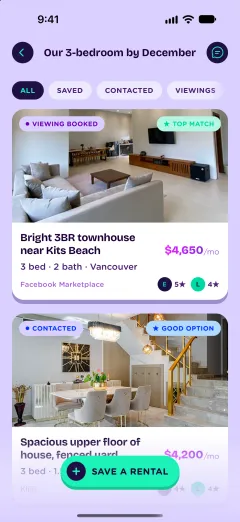
Save from the sites you already use — and more.






The problem
House hunting together is messy.
The search is scattered
Listings live on Marketplace, Kijiji, Craigslist, Zumper and more. Links get lost in texts, tabs and screenshots.
Two people, no shared view
You search separately, send links back and forth and lose track of who liked what.
Deciding is hard
Without price, beds, pets, parking and both opinions side by side, you go in circles.
Writing to landlords is tedious
Every listing needs a first message, a viewing request and a follow-up — fast, before it’s gone.
Moving has a long tail
References, proof of income, insurance, movers, utilities — all against a deadline.
Nestlist puts it all on one shared board — save, rate, discuss, message landlords and count down to move-in day, together.
Save from any site
Every listing in one place
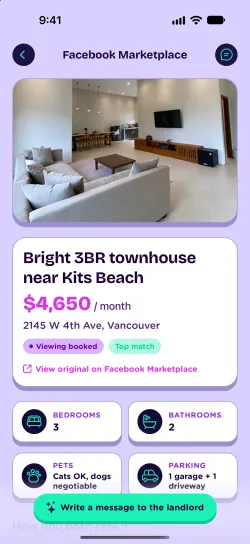
All the details from every rental site, side by side.
- Share a listing from Facebook Marketplace, Kijiji, Craigslist, Zumper, Rentals.ca, Realtor.ca, PadMapper and more
- Price, address, beds, baths, pets and parking kept together
- Always one tap from the original post
Decide as a team
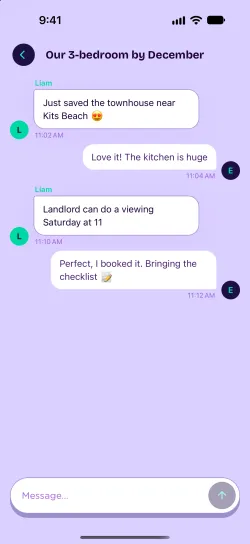
Talk it through in the app
Share finds, book viewings and agree on the one — all in one chat.
- Each of you rates every place, so top matches stand out
- Notes can be shared, or kept private
- Chat inside the board and plan viewings together
Message writer
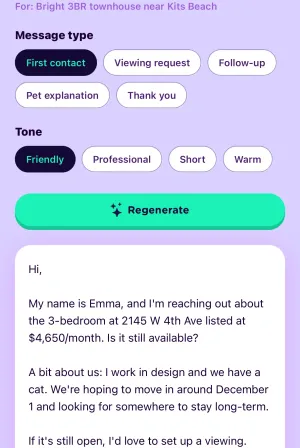
Message landlords in seconds
Friendly, professional, short or warm — written around your household.
- Ready-to-send drafts for first contact, viewing requests, follow-ups, pet questions and thank-you notes
- Pick the tone that fits, then edit before you copy
- Uses the listing and your household details, so it sounds like you
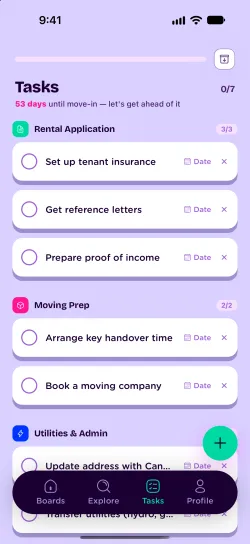
Move-in checklist
Never miss a moving task
From reference letters to key handover, everything stays on track.
- Set a goal date and watch the countdown
- A ready-made task list: references, proof of income, tenant insurance, movers, key handover and utilities
- Add your own tasks and dates
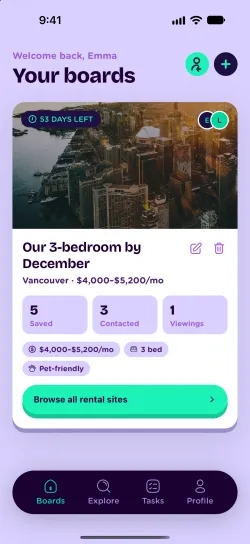
Your search at a glance
Stay on track to move-in day
See what’s saved, contacted and booked — with a countdown to your goal.
- Every listing moves from Saved to Contacted, Viewing booked, Applied and Shortlisted
- Filters show exactly where things stand
- Jump to the major rental sites, already set to your city
- Saved
- Contacted
- Viewing booked
- Applied
- Shortlisted
How it works
Three steps to your new place.
- 1
Save
Share listings from any rental site into your shared board.
- 2
Decide together
Rate, chat and compare until you both agree on the one.
- 3
Move in
Message landlords, apply and tick off every moving task.
Free to download. Upgrade when you’re ready.
Optional auto-renewing subscriptions — monthly, 3-month or yearly — through the App Store. Prices are shown in the app in your local currency. Restore purchases and cancel anytime in Settings → your name → Subscriptions.
FAQ
Questions, answered
Which rental sites can I save listings from?
How do my partner and I share a board?
Can roommates or family use Nestlist too?
Are my notes private?
How does the message writer work?
Is Nestlist free?
Where is Nestlist available?
How do I delete my account?
How do I contact support?

Find your next home together
Nestlist is coming soon to the App Store. Leave us a note and we’ll tell you the moment it lands.
 Nestlistby Pixeldea